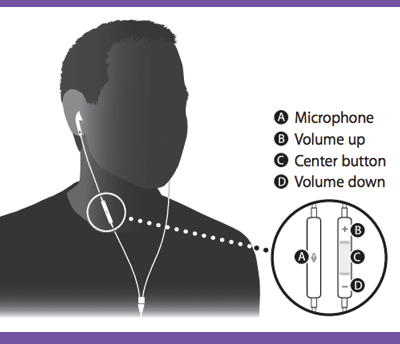
The stock earbuds are full of hidden features. With them, you can snap a photo, ignore calls, and more. There are 10 shortcuts in total, and they’re all outlined right here.
If you’re listening to music, toggle pause or play by tapping the center button once.
To fast-forward a song, tap the center button twice and long-press on the second tap.
To rewind a song, tap three times and long-press on the third tap.
To skip a song, double tap.
To go to the previous song, triple tap.
If you have an incoming call, tap the center button once to answer. Tap again to hang up.
To ignore an incoming call, long-press the center button. You’ll hear two beeps to confirm that the caller was sent to voice mail.
If you’re on the phone and you get a new call, tap the center button once to switch calls. To end that new call, hold the center button down for 2 seconds.