< All Topics
Print

Type You Commands To Siri Instead of Speaking Them

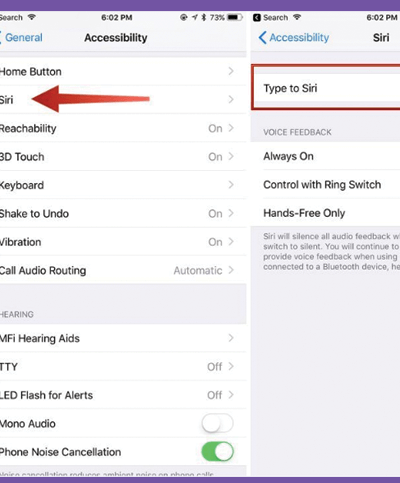
Siri is great, but you can’t speak to Siri and get answers out loud in every situation (and, for some people with disabilities, speaking may not be an option). In those cases, you can use Siri if you have Type to Siri turned on. This trick lets you access Siri and give it commands by typing. Here’s what to do:

  1. Tap Settings.
  2. Tap General (skip this step on iOS 13 and up).
  3. Tap Accessibility.
  4. Tap Siri.
  5. Move the Type to Siri slider to on/green.
  6. Now, activate Siri, and a keyboard appears to let you type your command. You can also speak using the microphone icon.
Categories
Table of Contents

Request Consultation

Request Portal Access