< All Topics
Print

Use A Hidden Dark Mode

Dark modes are a popular feature for people who often use their devices in the dark. With dark mode enabled your bright iPhone interface switches to dark colors that are easier on the eyes in low-light situations (they’re also helpful for people with color blindness). While the iPhone doesn’t offer a true dark mode, this trick gets you petty close:
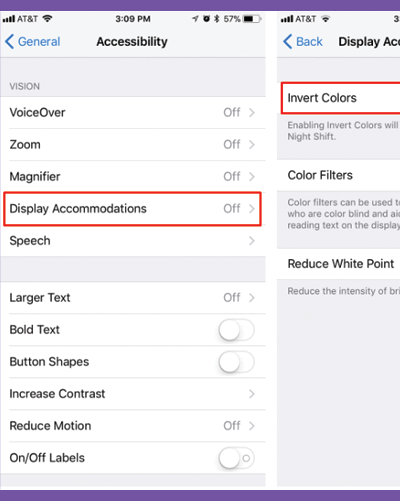
  1. Tap Settings.
  2. Tap General.
  3. Tap Accessibility.
  4. Tap Display Accommodations.
  5. Tap Invert Colors.
  6. Pick either Smart Invert (which switches some on-screen colors to Dark Mode) or Classic Invert (which switches all colors).
Categories
Table of Contents

Request Consultation

Request Portal Access