< All Topics
Print

Make Far-Away Icons Easier To Reach

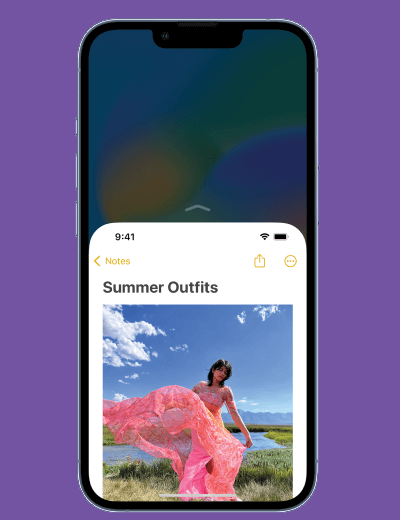
As iPhone screens get bigger, reaching icons in the far corner opposite your hand gets harder. Not if you know this trick. The iOS includes a feature called Reachability that pulls the top icons down toward the bottom of the screen to make them easier to tap. Here’s how:
  1. On iPhones with a Home button, gently double-tap (but don’t click) the Home button.
  2. On the iPhone X and up, swipe down from the indicator line at the bottom of the screen.
  3. The contents of the screen move down.
  4. Tap the item that you want and the screen goes back to normal. If you’ve changed your mind, tap anywhere else on the screen to cancel.
Categories
Table of Contents

Request Consultation

Request Portal Access